Friday, September 16, 2016

FTC - Protect your computer from Malware

9/16/16, Hacking  of websites and emails has been a big issue this year and daily in the news. Here are some tips from the FTC about how to protect your computer. This is the first in a series of how to protect your computers, emails, servers, and cell phones from being hacked into. The most important step that all consumers and business that host blogs, websites, and social media, is go into your analytics to see "who is accessing your site" and viewing your pages. Governmental entities / Businesses IT professionals should remind employees not to open suspicious emails or open links.

Use the highest filters possible and scan your computers daily to check for viruses. If you host a blog, or a social media site for your work place / business, it is recommend that you remove all "work related" emails from your site use Gmail or some other Email site to avoid  your system from being comprised.

To our surprise CPAM's site has had just as many views from Russia as in the USA over the past year. Rich Coleman, CPAM  

Transcript from the FTC : Protect your computer from Malware

Malware is short for “malicious software."  It includes viruses and spyware that get installed on your computer or mobile device without your consent. These programs can cause your device to crash and can be used to monitor and control your online activity. Learn more about how to avoid, detect, and get rid of malware.


Would it surprise you to learn that millions of computers in the US are infected with malware? That's a lot of computers. So what's malware, and why should you care?
Malware, short for malicious software, includes viruses and spyware that get installed on your computer or mobile device without you knowing it. Criminals use malware to steal personal information and commit fraud. For example, they may use malware to steal the login information for your online accounts or to hijack your computer and use it to send spam. An infected computer can lead to serious problems, like identity theft.
The good news, there's a lot you can do to protect yourself and your computer. One of the most important steps you can take, install security software from a reliable company and set it to update automatically. The bad guys constantly develop new ways to attack your computer, so your software must be up to date to work.
Set your operating system and your web browser to update automatically too. If you're not sure how, use the help function and search for automatic updates. Don't buy security software in response to unexpected calls or messages, especially if they say they scanned your computer and found malware. Scammers send messages like these to trick you into buying worthless software, or worse, downloading malware.
 What else can you do? Use a pop up blocker, and don't click on links and popups. Don't click on links or open attachments in emails unless you know what they are, even if the emails seem to be from friends or family.
Download software only from websites you know and trust. Free stuff may sound appealing, but free downloads can hide malware. Make sure your web browser's security setting is high enough to detect unauthorized downloads. For example, use at least the medium security setting.
Even if you take precautions, malware can find its way onto your computer. So be on the lookout for these signs. Your computer runs slowly, drains its battery quickly, displays unexpected errors or crashes, it won't shutdown or restart, it serves a lot of popups, takes you to web pages you didn't visit, changes your home page, or creates new icons or toolbars without your permission.
If you suspect malware, stop doing things that require passwords or personal info, such as online shopping or banking. Use a different computer, maybe one at work or at your local library, to change your passwords. Update your security software and run a system scan. Delete files it flags as malware.
If you can't fix the problem on your own, get help from a professional. Your computer manufacturer or internet service provider may offer free tech support. If not, contact a company or retail store that provides tech support.
Keep in mind, the most important thing you can do to prevent malware is to keep your computer software up to date. And remember, it's easy to find trusted information about computer security. Just visit onguardonline.gov, the federal government site to help you stay safe, secure, and responsible online.
FTC, dealing with Malware video


Wednesday, September 14, 2016

Apple Warning --ITune gift cards Scams

iTunes Gift Card Scams

* 9/14/16- Information from the Apple Website:
Be aware of scams involving iTunes Gift Cards.

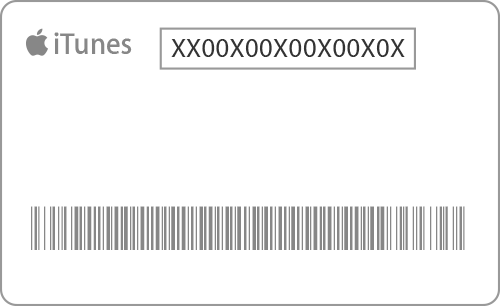
Regardless of the reason for payment, the scam follows a certain formula: The victim receives a call instilling panic and urgency to make a payment by purchasing iTunes Gift Cards from the nearest retailer (convenience store, electronics retailer, etc.). After the cards have been purchased, the victim is asked to pay by sharing the 16-digit code on the back of the card with the caller over the phone. 
It's important to know that iTunes Gift Cards can be used ONLY to purchase goods and services on the iTunes Store, App Store, iBooks Store, or for an Apple Music membership. If you're approached to use the cards for payment outside of the iTunes Store, App Store, iBooks Store, or Apple Music, you could very likely be the target of a scam and should immediately report it to your local police department as well as the FTC. 
Please do not ever provide the numbers on the back of the card to someone you do not know. Once those numbers are provided to the scammers, the funds on the card will likely be spent before you are able to contact Apple or law enforcement.  

Tips to avoid becoming the victim of a scam

  • If you are NOT purchasing an item from the iTunes Store, App Store, iBooks Store, or an Apple Music membership, do NOT make a payment with iTunes Gift Cards. There's no other instance in which you'll be asked to make a payment with an iTunes Gift Card.
  • Do not provide the numbers on the back of the card to someone you do not know.
  • Immediately report potential scams to your local police department as well as the FTC (ftccomplaintassistant.gov).

Contact Apple

If you have additional questions, or if you’ve been a victim of a scam involving iTunes Gift Cards, you can call Apple at 800-275-2273 (U.S.) or contact Apple Support online.

More information


Wednesday, August 31, 2016

National Missing and Exploited Children: Digital Citizenship / Cyberbullying

*8/31/16,  The NM & Exploited Children's website is a great resource for families, schools, Day Care providers, and  faith communities.  Please share this information and their website. Rich Coleman, CPAM

Cyberbullying is just what it sounds like - bullying through Internet applications and technologies such as instant messaging (IM), social networking sites, and cell phones. It can start easily—with a rumor, a photo, or a forwarded message—and just as easily spiral out of control. An embarrassing video posted to a social networking site by someone in Kansas tonight may be watched by someone in Japan tomorrow. Cyberbullying victims may be targeted anywhere, at any time. 

Common Forms of Cyberbullying [1]
  • Flaming and Trolling – sending or posting hostile messages intended to “inflame” the emotions of others
  • Happy-Slapping – recording someone being harassed or bullied in a way that usually involves physical abuse, then posting the video online for public viewing
  • Identity Theft/Impersonation – stealing someone’s password and/or hijacking their online accounts to send or post incriminating or humiliating pictures, videos, or information
  • Photoshopping – doctoring digital images so that the main subject is placed in a compromising or embarrassing situation
  • Physical Threats – sending messages that involve threats to a person’s physical safety
  • Rumor Spreading – spreading gossip through e-mail, text messaging, or social networking sites
Signs Your Child May Be a Victim of Cyberbullying
  • Avoids the computer, cell phone, and other technological devices or appears stressed when receiving an e-mail, instant message, or text
  • Withdraws from family and friends or acts reluctant to attend school and social events
  • Avoids conversations about computer use
  • Exhibits signs of low self-esteem including depression and/or fear
  • Has declining grades
  • Has poor eating or sleeping habits


    [1] Hinduja, S., Patchin J. Bullying Beyond the Schoolyard: Preventing and Responding to Cyberbullying. Thousand Oaks: Corwin Press, 2009.
* For more information on this topic please access the link below from the National Missing and Exploited website.

NetSmartz - Cyberbullying prevention tips


Federal Trade Commission ( FTC) : When / What to do if your computer life is held for ransom


Imagine if everything on your computer was “kidnapped” — including all of your precious family photos and important personal documents. And the only way you could access any of it again was if you paid a lot of money — or bitcoins — to a hacker. Even if you pay, there’s no guarantee you’ll get your stuff back.

Sounds like something out of a movie, right? Unfortunately, it’s happening in real life. It’s called ransomware. You might’ve heard news stories about ransomware attacks on hospitals, universities, and other large organizations, too.

Hackers do it by encrypting files on your computer — and files you’ve saved to connected hard drives or any shared folders. Once the files are encrypted you won’t be able to open them without the encryption key — which you can get only if you pay the amount hackers demand. That could be hundreds or thousands of dollars.

It’s a serious problem. That’s why the FTC is holding a ransomware event on September 7 in Washington, DC. We’ll talk with security experts, law enforcers, and others about what steps people and businesses can take to protect their computers — and what to do if you’re a victim.

Check out the event details — it’s free and open to the public. Or tune in to the webcast — we’ll post the link here a few minutes before the event starts.

In the meantime, check out this video on protecting your computer from malware:

FTC video - What to do When your computer is held for ransom


Gary Bubar, AAA Insurance Public Affairs Specialist: School's Open Drive Carefully


In a few weeks, over 1.5 million Michigan children will be making their way back to schools across our state.  Safely transporting students to and from school every day is an ongoing challenge.  For that reason, we invite you to join AAA in reminding everyone that “School’s Open – Drive Carefully.”

 For over seventy years, AAA has reminded motorists that with the start of another school year, traffic patterns and volume will be changing as children will be moving along streets, roads and neighborhoods.   Across the country, 309 children were killed and another 11,000 injured as pedestrians last year.  AAA’s traffic safety message from 1946 still resonates. Reminding motorists to slow down and stay alert continues to be an important message to start the school year with.

We invite you to join us in helping promote these Six Back to School Safe Driving Reminders:

Slow down – give yourself time to react.

Eliminate distractions – focus on driving.

Look before you back up – check first for children and obstacles.

Stop means stop – come to a complete stop at intersections where required.

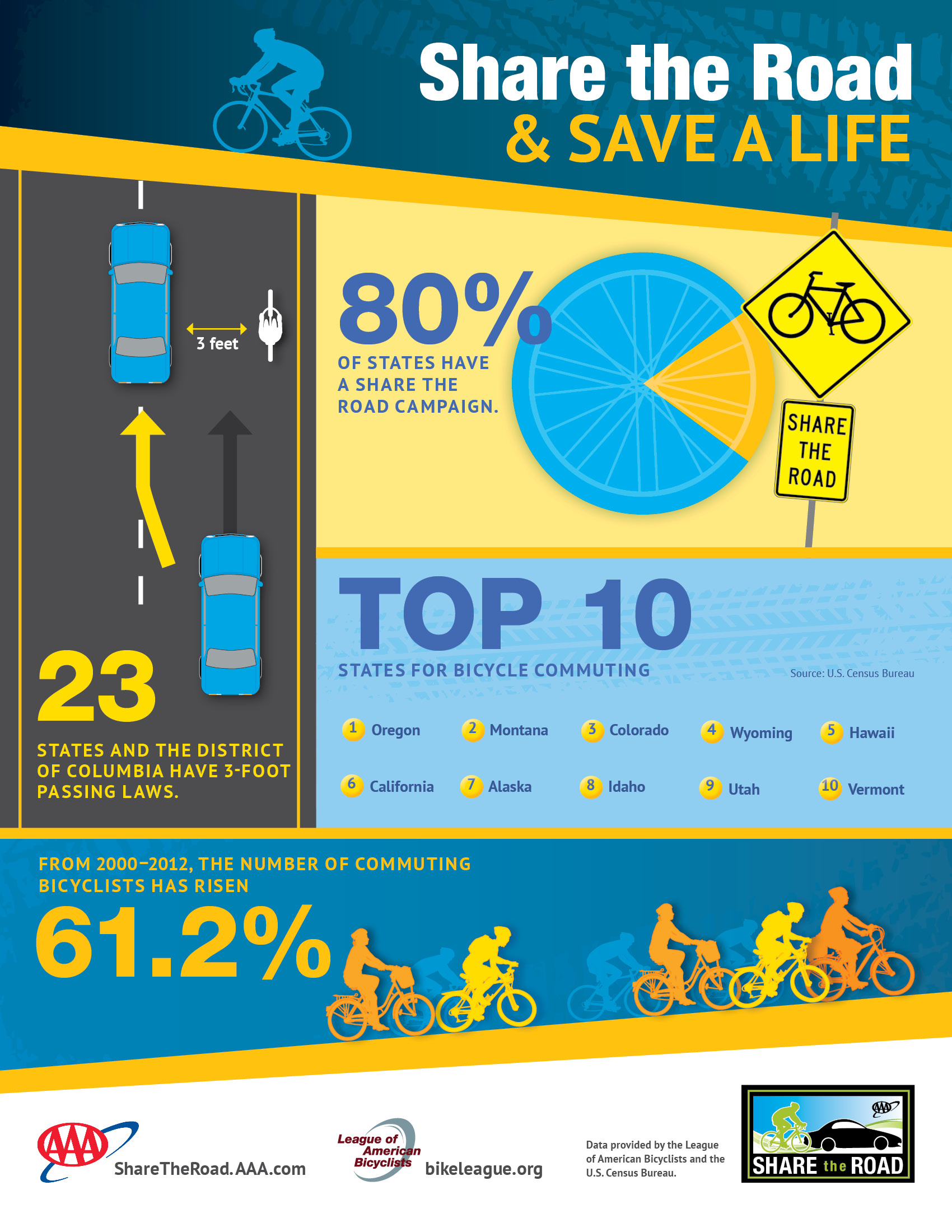
Bicycles are vehicles too – give cyclists plenty of room and be ready for the unexpected.
Talk to teens – 25% of all teen crashes occur between 4-7pm. 


School’s Open – Drive Carefully info:


Pedestrian safety info:


Pedestrian safety infographic:


Bicycle safety info:


Bicycle Safety infographic:


Additional AAA traffic safety info:


Please feel free to contact me at any time for additional information. Thank you for your dedication to traffic safety in your community.

Safe travels.

Gary Bubar | Public Affairs Specialist, Michigan

AAA - The Auto Club Group
1 Auto Club Drive
Dearborn, MI  48126
(313) 336-0974 ofc

Tuesday, July 26, 2016

"6 Things Parents Should Know About Pokémon Go", Author, Lynette Owen, Global Director of Trend Micro’s Internet Safety for Kids and Families program

7/26/16,  This is a great article, worth sharing,,,,  Rich Coleman, Pittsfield Twp. DPS / CPAM
July 12, 2016  By Lynette Owen
Last week, Nintendo launched Pokémon Go, a mobile gaming app based on its popular game franchise of the same name.  The app is free and is unique in that it requires players to move around in the real world in order to advance in the game and get rewards.  Players create their own avatar which is animated, as are the characters in the game, but they are overlaid onto real images coming through the camera of the player’s mobile device.  It’s the first widely available and, as early reports have shown, wildly popular app that take advantage of augmented reality.
I signed up and tested it within the confines of my home and backyard, my 9-year old looking over my shoulder eager to try too.  The novelty of looking through your phone camera and then suddenly seeing a character sitting on your own couch is definitely a cool experience.   I had to throw Poké balls at these characters in order to continue on in the game. In [my] reality I actually preferred these creatures not disappear because I captured them.
I had hoped to simply move around within a reasonable area within and near my home, but after 20 minutes of walking around – avoiding table legs and door jams – I realized the game is very limited if your geographic boundaries were limited too.  Eventually, I just got bored and stopped playing.
The news circuit has latched onto this craze and for the most part has focused on stories of people’s predictable lemming-like behavior, Nintendo’s stock price rise, and thedangers this new type of game presents (leading you to unsafe places, tracking a lot of personal data as it requires your geo-location, etc.).
I believe it is best to try out the app and judge for yourself.  I also highly recommend you do this beforeor WITH your child before letting them go search for imaginary creatures all over town (and possibly further).  As fun and simple as it may seem, there are definitely risks to be aware of.
Here are 6 things in particular to keep in mind:
  1. The app is called Pokémon Go and it is free. There are a lot of comments in the user agreement about in-app purchases, but I did not use the app long enough to get to that point of needing or wanting to buy anything.  That said, you can make sure your child does not rack up tons of real-world charges to your credit card bill by turning off the in-app purchasing feature, requiring a password for the app to charge against your credit card, or using gift cards for app purchases rather than a credit card.
  2. It is designed to be used on a mobile phone. Don’t use it with your iPad, Kindle Fire, or something that you can’t easily hold with one hand.
  3. There is no age limit.** However, you need a Google account or Pokémon Trainer Account to sign in to use it.  Google already requires you to be 13+ to have a Google account.  Nintendo allows kids under 13 to have a Pokémon Trainer Account, but signing up for one requires parental consent.
  4. **But, the app makers state it is ideally for age 9+. I don’t think many 9 year olds should just go off wandering around town to play this game by themselves, just as I wouldn’t recommend they go off anywhere without adult supervision.  I launched the app again after I left my house, and in the middle of a parking lot I discovered there were several more characters for me to capture. Staring at my phone and swiping towards an imaginary creature is not the safest thing to do there.
  5. You must allow the app to use your geo-location in order for it to work. Be aware of this and the privacy you may be giving up to the app as a result. You are basically signaling your physical location at all times and how long you spend in those places.
  6. The user agreement has many statements about safety, but there isn’t a way to report safety issues. The terms of use encourage players to use the app with care (i.e., watch where you’re going!).  It also states that people should not break any laws while using it (i.e., don’t rob people, don’t break into people’s private property, etc.)  What I didn’t see in those terms or anywhere in the game is a way to report concerns.  This is something I think will be demanded and should be designed into the game in the near future.
In the end, I got a little bored of the app.  I think it could be great fun if I had the time or energy to run around town looking for Pokémon.
That said, the idea of augmented reality has its merits; many applications of this technology are yet to be.  Imagine walking into a big box store, wondering where to find a certain item?  Don’t need to ask anyone, just hold up your camera and arrows will point you the way AND deliver a coupon to you by tapping on the image of the item once you find it.  The advertising potential for this technology is pretty huge (maybe Starbuck’s has something waiting in the wings?).
The Pokémon Go game is an incredible leap forward for augmented reality, and a new use of mobile devices.  For decades, Pokémon has been popular with kids, including the good old fashioned Pokémon trading cards.  But as an app to get kids up off the couch and play outside, I think it is somewhat flawed and has a lot of inherent risk.  If Nintendo made it so younger kids could find lots of characters within the confines of their home or a single park or playground, I would feel much better about my kids using it.
But as a replacement for sedentary gaming?   Not really.  Just have your kids put the phone down and go chase a real soccer ball or shooting star instead.
Lynette Owens is the Founder and Global Director of Trend Micro’s Internet Safety for Kids and Families program.  With 20+ years in the tech industry, Lynette speaks and blogs regularly on how to help kids become great digital citizens.  She works with communities and 1:1 school districts across the U.S. and around the world to support digital literacy and citizenship education.  She is a board member of the National Association of Media Literacy Education and SPARK Kindness, and serves on the advisory boards of INHOPE and U.S. Safer Internet Day.
Follow her on Twitter @lynettetowens


National Nigtht Out August 2nd, 2016, Police and Community Releations


On Tuesday August 2nd, 2016, law enforcement agencies across the country will be hosting National Night Out events with their community stake holders, "residents, businesses, faith community members" that participate in public safety watch programs. 

The 33rd annual National Night Out is designed to heighten crime & drug prevention awareness; generate support & participation in local anti-crime programs; strengthen neighborhood spirit & police-community partnerships; and lastly send a message to criminals to let them know that neighborhoods are organized and fighting back.

The National Night Out Campaign traditionally involves citizens, law enforcement, civic groups, businesses, neighborhood organizations & local officials.  This year there are several new co-sponsors of interest to Crime Prevention personnel  and the promotion of "after market safety products" for the home.
 
There are two popular products that consumers are asking crime prevention personnel about, they are "video door security systems".  Consumers are encouraged to educate yourself on how these products work, and how do the mobile apps work to secure your personal information and your home.
 
Check out the National Association of Town Watch for more details on the event and if your local agency is participating. * Not all agencies register so please contact your local law enforcement agency.
 
Products for consideration and review: 
 
Ring - www.ring.com
August- www.august.com  
 
I'll be  sharing more information in a follow up post on the Social Media sites also sponsoring the NNO event.
 
Rich Coleman, Pittsfield Twp. DPS / Crime Prevention Assoc. of MI


Friday, June 24, 2016

FTC - Online tracking – more than cookies


Wondering why you keep getting online ads targeted to you? Then, check out the FTC’s updated guidance on online tracking. It describes different methods of tracking, how they work, and how you can control them.   

How do websites remember you? For years, the answer has been by using “cookies” – pieces of information saved by your web browser, then used to remember you and customize your browsing experience.
Now, it’s about more than cookies. Without using cookies, companies can use “device fingerprinting” to track you, based on your browser’s unique configurations and settings. Plus, mobile app developers can use “device identifiers” to monitor different applications used on your device. Tracking can also occur on smart devices, like smart TVs.
How can you control online tracking? Here are some ways to get started:
  • Delete or limit cookies. Check your browser’s settings for tools under Help, Tools, Options or Privacy.
  • Reset identifiers on your mobile devices. That makes it harder to associate your device with your past activity. iOS users can do this by following Settings > Privacy > Advertising > Reset Advertising Identifier. For Android, the path is Google settings > Ads > Reset advertising ID. Remember that this will only prevent tracking based on past activity – it won’t prevent tracking going forward.
  • Learn about tracker blockers. There are tools that allow you to block ads called tracker blockers. They prevent companies from using cookies or fingerprinting to track your internet behavior. To find tracker blocking plug-ins, type “tracker blocker” in your search engine. Then, compare features to decide which tracker blocker is best for you.  
Want to learn more about safeguarding your information online? Check out the FTC’s advice on computer security, protecting your personal information, and limiting unwanted calls, mail and email.

Tuesday, June 14, 2016

FTC Alert: June 14, 2016 - Scammers say “Help Wanted”

June 14, 2016, Bridget Small ,Consumer Education Specialist, FTC    
          
Criminals don’t like getting caught. So, when they want to send and receive stolen money, they get someone else to do the dirty work. Some scammers develop online relationships and ask their new sweetheart or friend to accept a deposit and transfer funds for them. Other cons recruit victims with job ads that seem like they’re for legit jobs, but they’re not. Law enforcement calls the victims ’money mules.’ If you get involved with one of these schemes, you could lose money and personal information, and you could get into legal trouble.
Scammers post ads for imaginary job openings for payment-processing agents, finance support clerks, mystery shoppers, interns, money transfer agents or administrative assistants. They search job sites, online classifieds and social media to hunt for potential money mules.  For example, if you post your resume on a job site, they might send you an email saying, ‘We saw your resume online and want to hire you.’
 The ads often say:
  • the company is outside the U.S.
  • all work is done online
  • you’ll get great pay for little work
If you respond, the scammer may interview you or send an online application. He does that to collect your personal information and make the job offer seem legitimate. At some point, the scammer will ask for your bank account number, or tell you to open a new account, and then send you instructions about transferring money.
If you think you’re involved with a money transfer scam:
  • stop transferring money
  • close your bank account
  • notify your bank and the wire transfer service about the scam
  • report it to the FTC
If you’re looking for work, check out the FTC’s tips about jobs and making money and warning signs of a job scam.

Wednesday, May 4, 2016

May 3, 2016, FBI / Ann Arbor Police Dept. - Apprehend Food Contamination Suspect -- Advisory: Consumers Urged to Throw Away Potentially Contaminated Foods


For immediate release: May 3, 2016 Media contacts:

Jennifer Holton, MDARD, 517-284-5724 or Jennifer Eisner, MDHHS, 517-230-9804

 
Advisory: Consumers Urged to Throw Away Potentially Contaminated Foods

The Michigan departments of Agriculture and Rural Development and Health and Human Services are cooperating with the Federal Bureau of Investigation and local law enforcement in Ann Arbor on an investigation involving intentional food contamination at retail grocery stores in Ann Arbor. 

Thanks to citizen tips, the suspect was apprehended by the Ann Arbor Police Department. During interrogation, the suspect admitted to intentionally contaminating salad bars and/or produce sections of at least three grocery stores in the greater Ann Arbor area – Whole Foods, Meijer, Inc. and Plum

Market – at least twice in the last month. The suspect claims to have sprayed the food with a mixture of a commercial mouse poison, alcohol-based hand-sanitizer and water. Samples have been sent for further laboratory analysis to determine concentration.

The chemicals found in this mixture are a form of anti-coagulant, similar to what is found in medicines that have an anti-clotting function. Based on the known ingredients in the mixture at this time, MDHHS does not anticipate any adverse health effects on individuals who may have ingested potentially contaminated products.

The stores involved have been contacted and additional samples have been collected by law enforcement for further testing. MDARD food inspectors are in the stores this evening conducting follow-up assessments of the potentially affected stores.

“Out of an abundance of caution and to protect public health and food safety, I encourage consumers to dispose of any foods purchased from salad bars, olive bars and ready-to-eat hot and cold food areas from these stores between mid-March and the end of April,” said Jamie Clover Adams, MDARD director. “Although most of these types of foods may have already been eaten or disposed of, some may still be in refrigerators or freezers.”

Based on FBI investigation, there is the potential that other stores in Michigan may also have been targeted. These stores include:

Busch's
2240 S Main Street
Ann Arbor, MI
Cupcake Station
116 E Liberty
Ann Arbor, MI
Family Fare
2026 North Saginaw
Midland, MI
Kroger
3838 Richfield Road
Flint, MI
Meijer, #108
7300 Eastman Ave
Midland, MI
Meijer, #64
3145 Ann Arbor-Saline
Ann Arbor, MI
Meijer, #213
9515 Birch Run Rd
Birch Run, MI
Millers Mini Mart
3001 Bay City Rd
Midland, MI
Plum Market
375 North Maple
Ann Arbor, MI
Target
2000 Waters Road
Ann Arbor, MI
Tsai Grocery
3115 Oak Valley Drive
Ann Arbor, MI
Walmart
910 Joe Mann Blvd
Midland, MI
Walmart
7000 E Michigan Ave
Saline, MI
Whole Foods
990 W Eisenhower Pkwy
Ann Arbor, MI
Whole Foods
3135 Washtenaw Ave
Ann Arbor, MI

“While the risk for adverse health effects appears to be low, more investigation is being done to determine what level of exposure may have occurred,” said Dr. Eden Wells, chief medical executive, MDHHS. “If you have any health concerns, contact your healthcare provider or call Michigan Poison Control at 1-800-222-1222 with questions.”

The departments would like to acknowledge the diligence of employees at Whole Foods, the quick response of the FBI, law enforcement agencies, and local health officials, and those who provided tips via social media, which has led to a speedy resolution to this issue.

Food industry employees and consumers are reminded to be vigilant and to report any suspicious activities. Remember, “If you see something, say something.” Any suspicious activities should be immediately reported to local law enforcement.

Examples of things to watch for include employees or strangers who:

·         spray unknown substances in your store

·         enter or exit your operation through the wrong doors

·         hang around display cases, exposed food displays (e.g., produce or salad bars) or cold/hot food         displays

·         loiter in aisles

·         leave suspicious materials in your store

 
MDARD and MDHHS will continue to coordinate with all agencies involved, along with Washtenaw County Health Department and Michigan’s retail grocery industry.


Updates will be provided as new information becomes available.